Logging in
A user can login either by using a swipe card or a 5 digit pin (most common). Once logged in, confirm that your user name appears on the waiter label (in the top center section)
Pin security
Each waiter has a 5 digit password code. The first 2 digits are permanent. The last 3 digits are the ones changed. E.g. 20301 can change to 20786. Be sure to shuffle your pin regularly.
The system only accepts the first 5 digits of your pin, therefore, you may type extra digits in the end to confuse whoever may be looking 😉
P.O.S state
Before logging in, you should check that the system is in the correct state i.e. the shift and the connection to the server are both okay


Troubleshooting Error states
- Try to restart hotelex by terminating it using the windows task manager
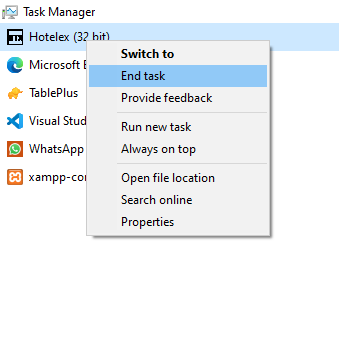
- Try to restart the P.O.S machine
- In the case of a failed connection to server, check that the network cable is properly attached
- If All POS stations have a connection error, the problem is is on the Server Side. Ask your Supervisor/Manager to confirm server and network switches are ON
Session Timer
As soon as you login to the P.O.S interface, a timer starts to count down for a number of seconds (depending on the current configuration, usually 25 seconds). When it's done, you will be automatically logged out.
The timer resets when you select an item category to give you time to search for the item or when you print an order.
The timer freezes when the user opens certain tabs such as the 'order checks view' or the on-screen touch keyboard or the 'payment details' window when you go to forward a bill